· retrogaming · 6 min read
Controller Controversy: The Unique Design of the Atari Jaguar and Its Impact on Gameplay
The Atari Jaguar's controller tried to be clever - a numeric keypad grafted onto a bulky gamepad - but cleverness and comfort are not synonyms. This piece unpacks the Jaguar's one-of-a-kind layout, how developers used (or ignored) it, and what its legacy teaches us about controller design then and now.
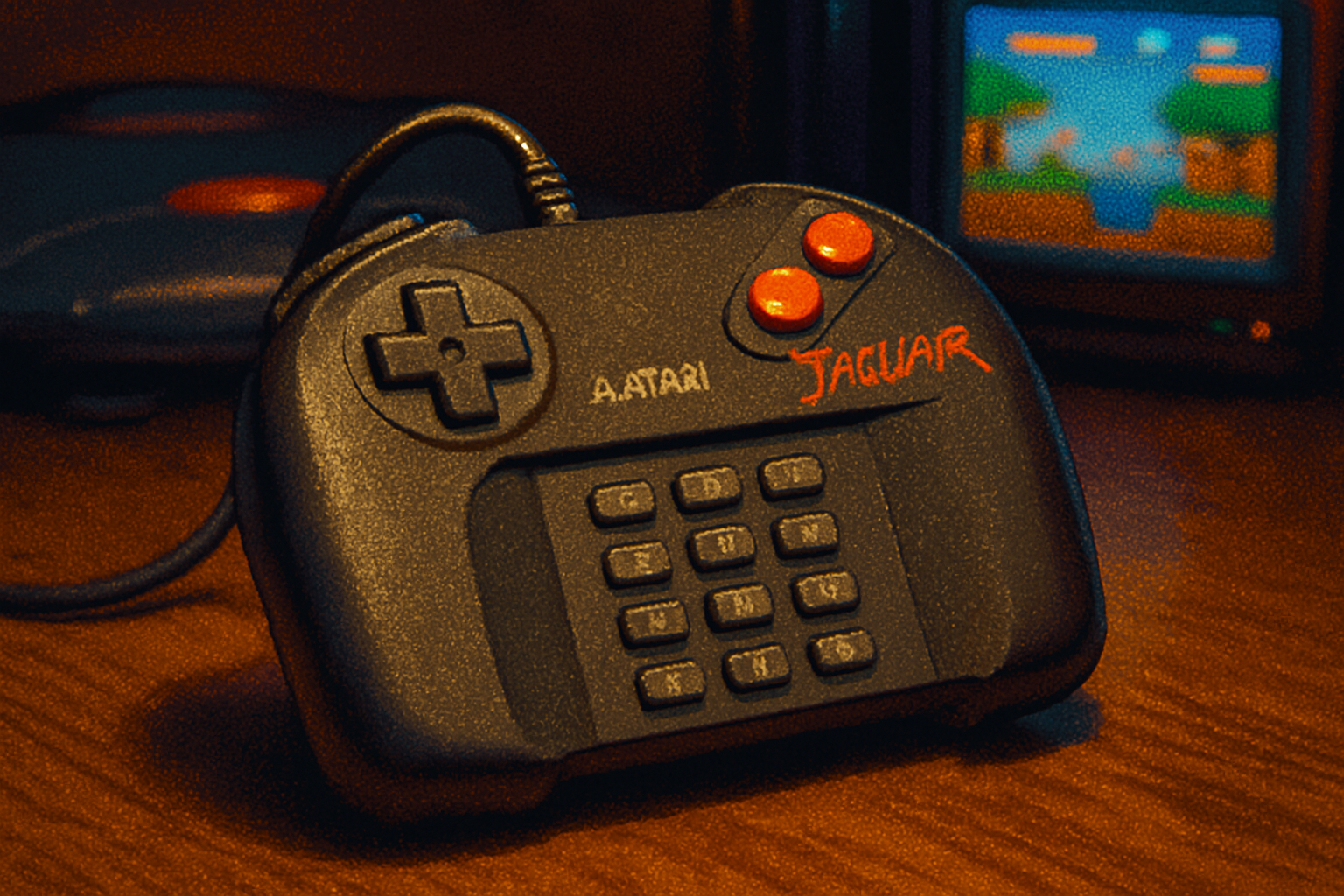
I remember the first time I picked up a Jaguar controller. It felt like holding a phone from the future that had been manufactured by a committee that never agreed on what a phone should feel like. In one hand: a D‑pad and three crowded face buttons. In the other: a tactile grid of tiny numeric keys, begging for shortcuts, macros, and authority. It was promising. It was awkward. It was very, very Atari.
The short version
The Atari Jaguar controller is one of those objects in gaming history that’s impossible to describe without smiling: a conventional gamepad bolted to a numeric keypad. The idea was alluring - more buttons, more options - but execution matters. The layout created a peculiar set of trade‑offs that influenced how games were designed, how players held the controller, and ultimately how the console was received.
(For a technical overview and history of the console, see the Atari Jaguar Wikipedia entry.) [https://en.wikipedia.org/wiki/Atari_Jaguar]
Anatomy of an oddball: what made the Jaguar controller different
- A conventional D‑pad on the left.
- Three face buttons (A, B, C) arranged in a tight cluster - smaller and closer together than contemporaries.
- A numeric keypad (12 keys) centered on the face of the controller, intended for direct command inputs and overlays.
- A bulky, somewhat top‑heavy shell that didn’t cradle the hand the way later designs would.
The keypad was the headline feature: a deliberate attempt to give games more inputs without resorting to shoulder buttons or second modules. It was a throwback to Atari’s relationship with keypads (think Atari 2600 keypad controllers) but reimagined for a 1990s multimedia pitch.
What Atari hoped the keypad would do - and why that sounded smart
Think of the keypad like the Swiss Army knife of inputs. More keys could mean:
- Direct weapon selection without pausing.
- Quick access to menus or inventory items.
- Mini‑puzzles and code entry without on‑screen directional mashing.
- A way for developers to map extra functions without changing the controller standard.
On paper, giving designers more buttons is rarely a bad idea. Modern controllers now boast as many triggers and paddles as they can reasonably fit. The Jaguar simply tried to do that a decade earlier - and with an analog of the numeric keypad, rather than ergonomically placed shoulder triggers or triggers under the fingers.
How the design shaped gameplay - the good
- Potential for complexity - For certain genres - strategy, simulations, or complex shooters - direct‑access keys can be a boon. If developers committed to the keypad, they could expose advanced functions without burying them in pause menus.
- Novel control schemes - A few developers toyed with the keypad in interesting ways, creating gimmicks and alternate input models that made Jaguar games feel different.
- Marketing differentiation - It gave Atari something visibly unique to sell in a crowded market - a tactile differentiator when many consoles looked and felt the same.
And the bad - ergonomics, adoption, and the tragedy of optional inputs
- Reach and comfort - The keypad was physically awkward to use mid‑game. Players’ thumbs had to stretch or re‑adjust grip, breaking the flow of play. The face buttons were small and cramped compared with contemporary controllers.
- Inconsistent use - Most developers ignored the keypad. Why design around an input most players won’t use? The result: a flashy feature that was largely cosmetic in practice.
- Learning curve and muscle memory - Players had established habits from the SNES and Genesis controllers. Introducing a fundamentally different input surface meant asking players to relearn actions - for a console that was already fighting for attention.
- Design overhead - For developers, the keypad asked for additional design time. With limited budgets and a shrinking install base, many teams opted for safer, conventional controls.
The net effect: promise without payoff. The keypad could have been a brilliant augmentation to gameplay - instead, it became an optional curiosity.
A few concrete examples (and why they matter)
You don’t need a videogame archeology degree to see the pattern. A handful of Jaguar titles used the keypad creatively; more used it for menuing, cheat codes, or not at all. Because it never reached critical mass among software, the keypad’s potential remained limited. That mismatch between hardware capability and software commitment is the real crime here.
Comparing the Jaguar to console controllers that ‘got it right’
Look at why certain controllers endure:
- The SNES controller kept things simple and readable. Two shoulder buttons, four face buttons - intuitive mapping.
- The DualShock introduced dual analog sticks and refined ergonomics, but it didn’t invent inputs for their own sake; it matched inputs to emerging genres (3D movement, camera control).
- Modern pro controllers add paddles and extra buttons - but they place them where the hands already are, or offer them as optional attachments for niche players.
The Jaguar’s keypad failed that litmus test: It added inputs, but it didn’t integrate them into the natural rest positions of the hands. In other words: clever, but inconsiderate.
Lessons for designers (and the nostalgic)
- Extra inputs must be reachable. Designers can dream up 47 functions, but if players can’t access those functions without a contortion, the functions are dead.
- Hardware features need software commitment. A unique button layout only becomes meaningful when the platform’s library embraces it.
- Familiarity & migration matter. Radical departures in control schemes must offer immediate, tangible benefits - or risk alienating users who already have muscle memory.
Analogy: adding a keypad to a controller is like giving a chef a drawer full of exotic knives mid‑service. It’s exciting until you realize the chef is already juggling flaming pans and now must learn which knife to grab.
Was the Jaguar controller a failure - or an interesting misstep?
It was both. As a commercial and ergonomic package, it failed to convince enough developers or players. As a design experiment, it’s fascinating. The controller shows what happens when hardware innovation outpaces software and when novelty is prioritized over usability.
In the archive of retro hardware, the Jaguar controller is not a villain as much as a cautionary tale: a reminder that more buttons are not a solution in themselves. They must be intelligently placed, thoughtfully adopted by developers, and genuinely useful to players.
Final verdict (and an invitation)
The Jaguar controller offered something brave and odd. It wanted to expand what a gamepad could do. But bravery without empathy for the player’s hands and habits gives you aesthetic novelty and a pile of ignored keys. The result influenced gameplay by nudging developers toward-or away from-certain design choices, and it left players with an experience that was often more distracting than liberating.
What do you think? Was the keypad a missed opportunity that could have worked under different circumstances, or an arrogant flourish that doomed itself the moment it left the drawing board? Share your favorite Jaguar controller memory - the elegant hack or the maddening fumbling - and let’s argue like retro gamers do best.
References
- “Atari Jaguar” - Wikipedia: https://en.wikipedia.org/wiki/Atari_Jaguar
- “Atari Jaguar controller” - Wikipedia (controller-specific details and history): https://en.wikipedia.org/wiki/Atari_Jaguar_controller